One YouTube downloader for video and audio
Paste any YouTube link and choose MP4 video up to 1080p or MP3 audio up to 320kbps from the same box. Real file sizes are shown before you commit, a live progress bar tracks the conversion, and the file saves automatically when it is ready. No account, no desktop software, no browser extension required, though optional browser add-ons exist for Firefox and Edge if you would rather have a button in your toolbar. It works on every phone, tablet and computer.
What 1080p, 720p and 480p really cost: measured, not estimated
We ran the same 10 minute 34 second video through this tool at every resolution it offers and recorded the delivered file. Source: the Blender Foundation's Big Buck Bunny, Creative Commons BY, in its 60fps upload.
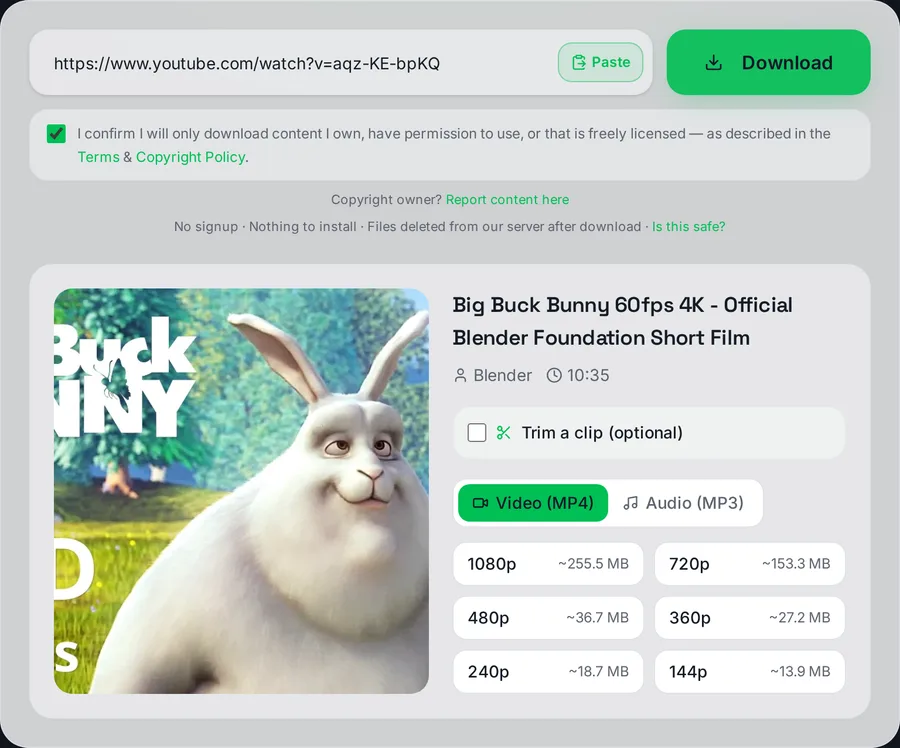
Every resolution the tool can deliver for this video, with the estimated size of each. These estimates are priced on the H.264 stream we actually download, so they match the delivered file.
| Resolution | Delivered | File size | Time to download |
|---|
| 1080p | 1920 x 1080, H.264 + AAC | 268,282,051 bytes (256 MB) | 25.4 s |
| 720p | 1280 x 720, H.264 + AAC | 161,192,857 bytes (154 MB) | 15.5 s |
| 480p | 854 x 480, H.264 + AAC | 38,777,162 bytes (37 MB) | 7.7 s |
| 360p | 640 x 360, H.264 + AAC | 28,865,104 bytes (28 MB) | 7.3 s |
The useful surprise is where the saving actually is. Going from 1080p to 720p cuts the file by about 40 percent. Going from 720p to 480p makes it four times smaller. If your goal is a small file for a phone or a slow connection, 480p is the setting that does the work, not 720p.
Those numbers are on the large side because that upload is a 60fps clip mastered from a 4K source, which is close to the worst case for file size. For comparison we ran a second upload of the same film, this one 24fps and 9 minutes 57 seconds long against the first one's 10 minutes 34. At the same 1280 x 720 resolution and the same codec it delivered 84,829,606 bytes against 161,192,857, a little over half the size, and only about six percent of that gap is the shorter running time. Further down the ladder the two uploads converge: 480p differed by 7 percent and 360p by 12 percent. At the high end, frame rate and how much motion is on screen move the file size more than the resolution label does.
Why the resolution you picked is sometimes not the one you get
This is the part most download sites leave you to guess at, so here is exactly what happens.
YouTube does not store one video per resolution. It stores several encodings of each resolution in different video codecs, and the codecs it offers are not the same at every resolution. We ask for H.264 (also written avc1) first, because H.264 is the format that plays on an iPhone, an older Android, a smart TV and inside Premiere, DaVinci Resolve or CapCut without converting anything first.
On that second upload we tested, this is what YouTube publishes:
| Resolution | Codecs YouTube offers | H.264 available |
|---|
| 1080p | AV1, VP9 | No |
| 720p | AV1, VP9, H.264 | Yes |
| 480p and below | AV1, VP9, H.264 | Yes |
Ask that upload for 1080p and you get a 1280 x 720 H.264 file, because 1080p simply does not exist in H.264 for it. We would rather hand you a 720p file that plays everywhere than a 1080p file that will not open on your phone. When a resolution is missing from the list, it is almost always this, and not a fault at your end.
1080p is the ceiling here, and that is a deliberate choice
We top out at 1080p Full HD. There is no 1440p and no 4K option, and it is worth being straight about why rather than quietly leaving them off the menu.
Above 1080p, YouTube publishes only VP9 and AV1. We confirmed this on the 4K upload we measured: at 2160p and 1440p the only codecs available were AV1 and VP9, with no H.264 at any of them. So a 4K download from YouTube is necessarily a VP9 or AV1 file. Those play fine in a modern desktop browser and badly or not at all elsewhere: iPhones will not play VP9 inside an MP4 container, something we hit directly with Instagram files and had to fix in our own downloader, and plenty of editing software will refuse the file or need a slow transcode first.
1080p is not an arbitrary cap. It is the highest resolution YouTube publishes in the codec that plays everywhere. If you specifically need 4K and you are happy handling VP9 or AV1 yourself, a desktop tool is the honest recommendation, and this is not it.
Audio is always merged in
Above 720p YouTube keeps the picture and the sound as two separate streams. Our server fetches both and merges them with FFmpeg before the file reaches you, so a high resolution download never arrives silent. That silent file problem is common enough on other sites that we wrote up what causes it and how to fix it.
What affects how long a download takes
Most files finish in well under a minute. Three things move that number: length (an hour-long video is simply more data to fetch and mux than a three-minute one), resolution (1080p can be several times the size of 720p, and MP4 downloads fetch a video stream and an audio stream and merge them, which is two transfers rather than one), and trimming, which is faster than a full download because only the selected section is fetched. The progress bar reports real progress from the encoder, not a fake animation, so if it is moving, the job is working.
Is YouTube blocking downloads now?
Not across the board, but it has become stricter with the servers that do the downloading. YouTube regularly asks automated traffic to prove it is not a bot, and it does that far more often to data-centre addresses than to home connections. Most public videos still download normally here. When YouTube pushes back on a particular video, the job is retried by another route before it gives up, which is why the odd download takes longer than usual.
The Download button inside the YouTube app is a different thing altogether. It is a YouTube Premium feature that keeps a copy for offline viewing inside the app, and it never gives you a file you can move, edit or play somewhere else. That gap is what a downloader like this fills, for videos you have the right to keep.
Is this YouTube downloader safe?
It is a fair question, because plenty of download sites are not. The warning signs are always the same: a big download button that is really an advert, an installer or "codec pack" you are told to run, a request for your Google password, or a browser extension you must add before anything works. None of that happens here. The conversion runs on our server, the only file you get is the video or audio you picked, and it is deleted on our side once it has been delivered.
The site does show ads to pay for the servers, and they are kept visually apart from the converter. Each download also passes a quick automated check that stops scripts from abusing the service, which is why a short verification step can appear before a file starts.
What this tool cannot do
Being straight about the limits saves you time. Private and unlisted videos, age-restricted videos and members-only content all require a signed-in account, and we never ask for your YouTube login, so those fail by design. Live streams have no finished file until the broadcast ends and is published as a normal video. Some titles are region-locked by the rights holder and may be unavailable from our servers even though they play for you. Our guide on why downloads fail walks through each case.
Works on phones, tablets and computers
The downloader runs entirely in the browser, with nothing to install. On iPhone use Safari and the file lands in the Files app; on Android it appears in Downloads and in your gallery. The device by device walkthrough is in our guide on how to download YouTube videos.
Beyond YouTube
The same engine downloads from TikTok, Instagram, Facebook, Twitter/X, Pinterest and Dailymotion, see the TikTok, Instagram, Facebook and Twitter/X downloaders. Worried about sketchy converter sites in general? Our guide explains how to tell a safe YouTube downloader from a dangerous one.
Download only content you own, have permission to use, or that is public domain / Creative Commons licensed. This educational tool is not affiliated with YouTube, our legality guide explains the rules.
