YouTube to WAV Converter
Download YouTube audio as lossless, uncompressed WAV — perfect for editing and DAWs. Free, no signup.
Copyright owner? Report content here
How it works
Copy the link
Open the video you want and copy its URL from the address bar or the Share button.
Paste it above
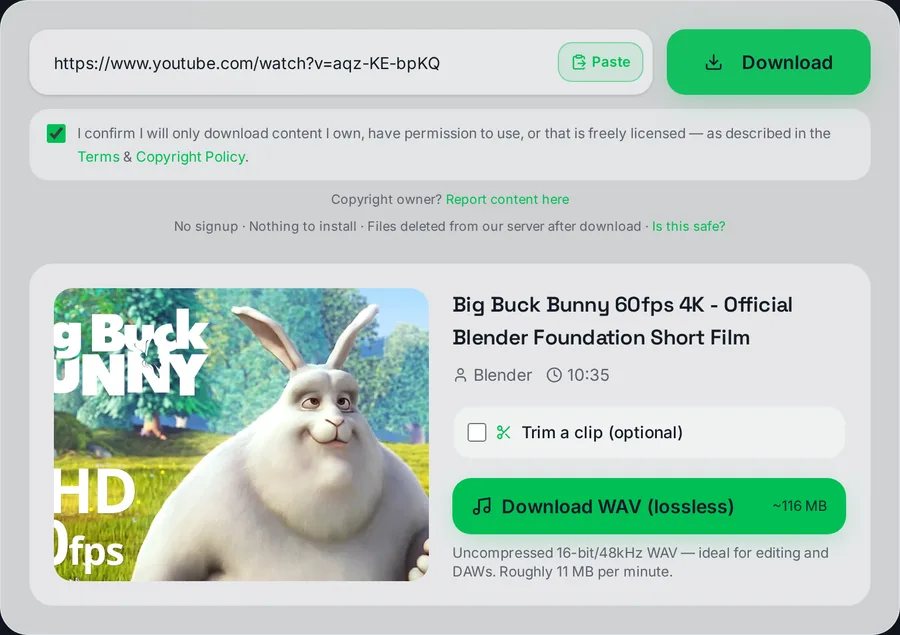
Drop the link into the box and press Download. We analyse it in seconds.
Pick the quality
Choose a resolution from 144p up to 1080p Full HD.
Save the file
Watch the live progress bar — your file downloads automatically when it's ready.
Convert YouTube to WAV — lossless, uncompressed audio
WAV is the uncompressed, lossless audio format that editors, producers and DAWs (Ableton, FL Studio, Audacity, Premiere, Logic) expect. Paste a YouTube link above and download the audio as a clean 16-bit / 44.1kHz WAV file — free, no signup, ready in seconds. Unlike MP3, WAV keeps every sample exactly as decoded, with no compression artefacts introduced.
How to convert YouTube to WAV
- Copy the YouTube link — from the address bar or the Share button.
- Paste it above and press Download. We read the video in seconds.
- Click "Download WAV" — the server extracts the original audio stream and exports it as an uncompressed WAV file that saves automatically.
Why choose WAV over MP3?
- Editing without generation loss. Every time you re-export an MP3 you re-compress it. WAV is lossless, so it survives repeated editing untouched — the right choice for sampling, remixing and post-production.
- DAW and editor compatibility. WAV imports natively into every audio and video editor without transcoding.
- Full dynamic range. 16-bit/44.1kHz WAV is CD-quality and preserves everything the source stream contains.
The honest note about source quality
Important truth most converters hide: YouTube stores audio in lossy formats (AAC/Opus) at roughly 128–160kbps. Exporting that as WAV makes a lossless container, but it cannot recreate detail YouTube's compression already discarded — the WAV is a perfect copy of a lossy source, not true studio-master quality. So WAV is the right pick when you need an editing-friendly, lossless working file (no further generation loss), not because it magically restores fidelity. If you just want to listen, a 320kbps MP3 sounds identical at a tenth of the size.
File size — plan ahead
WAV is big: roughly 10 MB per minute (~600 MB per hour), because it's uncompressed. A 4-minute song is around 40 MB. For long recordings where you only need to listen, use the MP3 converter instead; reach for WAV specifically when a project needs a lossless working file.
Works on every device
Runs entirely in the browser — no software. On desktop the WAV lands in your Downloads folder ready to drag into your DAW. On iPhone use Safari (file goes to Files → Downloads); on Android it saves to Downloads. Very long videos may take a moment given the file size.
Convert only audio you have the right to use — your own uploads, licensed content or Creative Commons material. See our legality guide. This educational tool is not affiliated with YouTube.

Frequently asked questions
Is the YouTube to WAV converter free?
Yes — completely free, no signup, no watermark. Download as many WAV files as you like.
Is WAV better quality than MP3 from YouTube?
WAV is lossless, but YouTube's source audio is already lossy (AAC/Opus ~128–160kbps). WAV preserves that source perfectly for editing, but can't restore detail YouTube removed. For listening, a 320kbps MP3 sounds the same at a tenth the size.
Why is the WAV file so large?
WAV is uncompressed — about 10 MB per minute (~600 MB per hour). That's the trade-off for lossless, editing-friendly audio.
What format is the WAV exactly?
16-bit / 44.1kHz PCM WAV — CD quality, and the standard that every DAW and audio editor imports natively.
Can I use this for music production?
Yes — WAV is the right working format for sampling, remixing and editing because it survives repeated exports without generation loss. Just remember the source is a lossy YouTube stream.
Does it work on iPhone and Android?
Yes. On iPhone use Safari — the WAV saves to the Files app. On Android it lands in your Downloads folder.
This tool is part of an independent, experimental and educational project. It is not affiliated with or endorsed by any video platform, and it is not intended to harm any company or violate any platform's policies. Please only download content you own, have permission to use, or that is public domain / Creative Commons licensed — and always respect the source platform's Terms of Service and copyright law.