
YouTube to MP3 Converter
Turn any YouTube video into high-quality MP3 audio up to 320kbps, free, with no signup or software.
Copyright owner? Report content here
No signup · Nothing to install · Files deleted from our server after download · Is this safe?
How it works
Copy the link
Open the video you want and copy its URL from the address bar or the Share button.
Paste it above
Drop the link into the box and press Download. We analyse it in seconds.
Pick the quality
Choose a bitrate from 64 to 320kbps depending on the audio quality you need.
Save the file
Watch the live progress bar. Your file downloads automatically when it's ready.
The fastest way to convert YouTube to MP3
YouTubeToMP3X turns any YouTube video into a clean MP3 file in under a minute. Paste a link, switch to the Audio (MP3) tab and pick a bitrate from 64 to 320kbps. Our server extracts the original audio stream from the video and converts it once with FFmpeg, no screen recording, no re-compression, no watermarks and no bundled software. It works in any browser on Windows, Mac, Linux, iPhone and Android.
Which MP3 bitrate should you choose?
The right bitrate depends on what you are converting. YouTube itself stores audio at roughly 128-160kbps (AAC/Opus), so a 320kbps MP3 preserves everything the source has while a lower bitrate saves space:
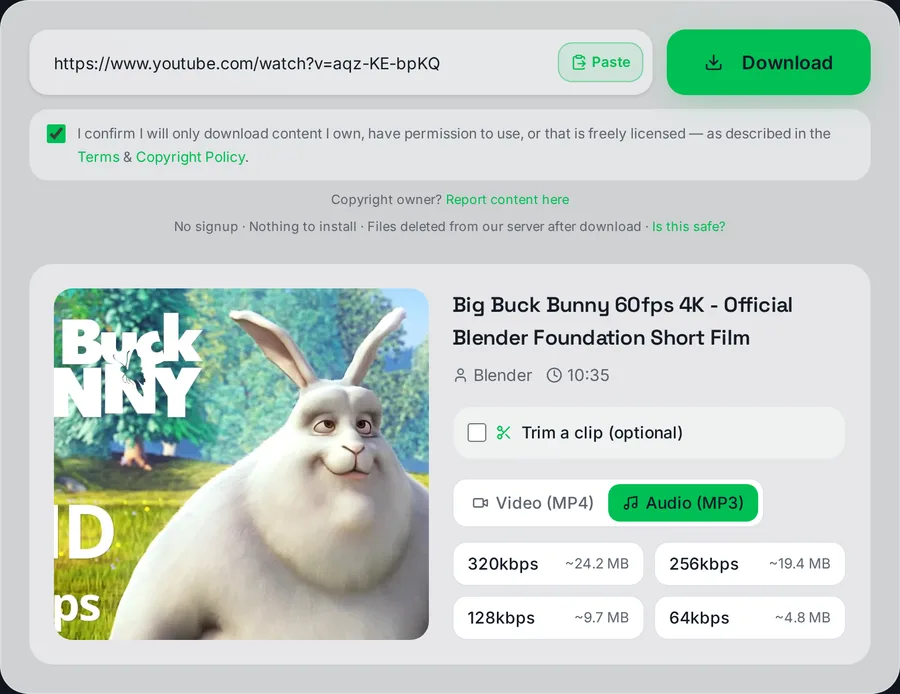
MP3 mode: the four bitrates, each with an estimated file size before you commit to anything.
- 320kbps, music and critical listening. Maximum quality, ~140 MB per hour. Music lover? Use the dedicated 320kbps converter.
- 256kbps, everyday music listening with smaller files.
- 128kbps. Podcasts, interviews, lectures. Speech stays perfectly clear at ~56 MB per hour.
- 64kbps. Voice memos and audiobooks when storage is tight.
Wondering whether 320kbps is worth it? Our honest breakdown: YouTube to MP3 at 320kbps, what you actually get.
Tested on the live converter
Numbers from an actual conversion run on this site on 22 August 2026, measured with
ffprobe, not estimates. Source: “Big Buck Bunny 60fps 4K, Official Blender
Foundation Short Film” (Creative Commons Attribution licence), converted in full at
128kbps.
- Source length: 10 minutes 34 seconds
- Quality chosen: 128kbps MP3
- Time from pressing Download to the file being ready: 27 seconds
- Resulting file: 10,194,738 bytes (9.7 MB)
- Output: MP3, 48kHz, stereo, measured at exactly 128kbps
A full ten-and-a-half-minute track took under half a minute, so a typical three-to-four minute song finishes in well under that. Longer videos take proportionally longer. The file has to be fetched and encoded before your download starts, which is why you see a progress bar rather than an instant link.
If you specifically want maximum bitrate, our 320kbps converter has the full 64/128/256/320 comparison with measured file sizes and encode times.
Why people use a YouTube to MP3 converter
- Podcasts that only exist as video, take them on your commute without burning mobile data.
- Lectures and language lessons, study offline, on any device, at your own pace.
- Your own uploads, recover the audio master from your channel when the original file is gone.
- Creative Commons and royalty-free music, build a legal offline library from freely licensed sources.
Only need a clip? Our YouTube to MP3 cutter lets you trim just the section you want, great for ringtones.
YouTube to MP3 vs YouTube to MP4
Only need the sound? MP3 gives you a far smaller file that plays in every music app. Want the picture too? Use our YouTube to MP4 converter for video up to 1080p, or the all-in-one YouTube downloader that lets you pick either on one page. For Shorts there is a dedicated Shorts downloader, and whole playlists are handled by the playlist downloader.
How we keep quality high
Many converters decode and re-encode audio several times, which stacks compression artefacts. We download the highest-quality audio stream YouTube offers, convert it exactly once and deliver the file directly, with a live progress bar so you always know what is happening. Read more in our guide on how to extract audio from a YouTube video.
Please convert only audio you have the right to save: your own uploads, licensed content, or Creative Commons material. This educational tool is not affiliated with YouTube. See our post on the legality of downloading YouTube videos.
Frequently asked questions
Which bitrate should I choose?
320kbps for music, 128kbps for podcasts and speech, 64kbps when file size matters more than fidelity.
How long does conversion take?
Usually under a minute. A live progress bar shows download and conversion status in real time.
Is there a length limit?
Very long videos (several hours) may time out, try a shorter section or a lower bitrate.
Do the MP3s have a watermark or intro?
No. You get clean audio exactly as it exists in the source video.
Can I convert music from YouTube legally?
Only if you own it, have permission, or it is freely licensed. Commercial music is protected by copyright in most countries.
How was this tool?
5 / 5 · 3 ratings
This tool is part of an independent, experimental and educational project. It is not affiliated with or endorsed by any video platform, and it is not intended to harm any company or violate any platform's policies. Please only download content you own, have permission to use, or that is public domain / Creative Commons licensed, and always respect the source platform's Terms of Service and copyright law.