No signup · Nothing to install · Files deleted from our server after download · Is this safe?
Why 320kbps
The highest MP3 setting, with the source audio shown first
The bitrate you ask for is the bitrate you get
We measured every option on a 60-second test clip. Each came back at exactly the requested bitrate, and 320kbps took the same 9 seconds as 64kbps, so the top setting costs file size, not time.
Measured: 60 seconds at each bitrate
320kbps2.44 MB
256kbps1.96 MB
128kbps1.00 MB
64kbps0.52 MB
Source audio shown first
The codec, bitrate and sample rate of the video's own audio appear before you download.
Tags and cover art
The title goes into the MP3's tags, with the video's thumbnail as square cover art.
One bitrate, one button
This page makes 320kbps only; the standard converter has 64 to 256kbps.
Nothing resampled
The MP3 keeps the 48kHz sample rate of YouTube's own audio stream.
How to convert YouTube to MP3 at 320kbps
1
Copy the link
Videos, Shorts and music videos all work, from the address bar or Share.
2
Paste it above
The page reads the video and works out what its audio really is.
3
Check the source
Codec, bitrate and sample rate sit next to the size of the MP3.
4
Press Download 320kbps MP3
The file saves with its title and cover art already inside.
Convert YouTube to MP3 at 320kbps: free, with no signup
This is a dedicated YouTube to MP3 320kbps converter: paste any YouTube link above, pick 320kbps, and download the highest-quality MP3 the format allows. Free, no signup, no watermark. The file is ready in seconds with a live progress bar, and it plays in every music app, car stereo and editor on earth.
What 320kbps means on this page. 320kbps is the bitrate of the MP3 this converter produces. YouTube delivers its own audio at roughly 128 to 160kbps, so converting at 320kbps preserves what that source contains; it does not create detail the original never had. Paste a link and this page shows you the real codec, bitrate and sample rate of that video's source audio, as reported by the extractor, before you download anything.
Why 320kbps is the right choice for music
320kbps is the maximum bitrate the MP3 format supports, at this level, compression is effectively transparent, preserving cymbal detail, reverb tails and stereo width that lower bitrates smear. If you're saving music you'll actually keep and replay, 320kbps is the setting.
Bitrate
Best for
Size per hour
320kbps
Music, concerts, DJ mixes, critical listening
~140 MB
256kbps
Everyday music with smaller files
~112 MB
128kbps
Podcasts, lectures, speech
~56 MB
64kbps
Audiobooks when storage is tight
~28 MB
The honest answer about 320kbps quality
Most converters promise "studio quality" and hope you never ask questions. YouTube stores audio at roughly 128-160kbps (AAC/Opus), and no converter on the internet can add back what YouTube's compression removed. What 320kbps actually does is protect the conversion. Converting between lossy formats always costs a little fidelity, and a generous bitrate makes that loss inaudible. A 128kbps MP3 of a 150kbps source stacks two rounds of compression; a 320kbps MP3 keeps essentially everything the source had. The source sets the ceiling, 320kbps protects the ceiling. The full technical breakdown is in our 320kbps deep-dive guide.
Real 320kbps conversion test
We ran this converter against a Creative Commons source and measured the output with
ffprobe rather than quoting the settings back at you. Test source:
"Big Buck Bunny 60fps 4K, Official Blender Foundation Short Film"
(YouTube ID aqz-KE-bpKQ, Creative Commons Attribution licence), first 60 seconds,
converted on 22 August 2026.
The source stream our converter actually pulls is Opus, measured at
128.6kbps, 48kHz, stereo (YouTube format 251), so roughly 128kbps of real audio
information is all that exists before any MP3 encoding begins.
Requested
Measured output
File size (60s)
Processing time
Output format
64kbps
64kbps
521,010 bytes
9s
MP3, 48kHz, stereo
128kbps
128kbps
1,001,394 bytes
10s
MP3, 48kHz, stereo
256kbps
256kbps
1,962,162 bytes
9s
MP3, 48kHz, stereo
320kbps
320kbps
2,442,546 bytes
9s
MP3, 48kHz, stereo
Three things the measurements show. Every requested bitrate came back at exactly that bitrate. 320kbps really is 320kbps. Processing time barely moved (9-10 seconds for all four),
so picking 320kbps costs you nothing in speed. And the file grew 4.7× from 64kbps to
320kbps while the source information stayed fixed at ~128.6kbps.
Converting a lossy source to a 320kbps MP3 does not restore audio information that was
absent from the original source. A higher output bitrate mainly reduces additional compression loss
during the conversion. That is the whole reason to choose it: not to gain detail, but to
avoid throwing more away.
Note the 48kHz sample rate, it matches the Opus source exactly, so nothing is resampled on the
way out. Our bitrate options are 64, 128, 256 and 320kbps.
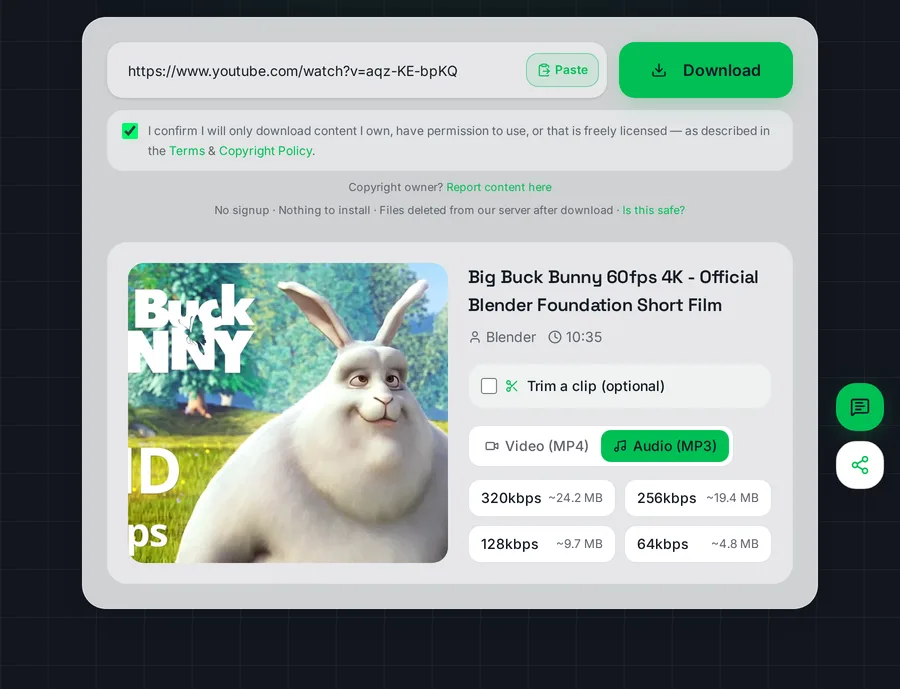
The quality chooser as it appears after a link is analysed. The estimated sizes shown here match what we measured: the 128kbps estimate of ~9.7 MB came out at 10,194,738 bytes.
Works on phones, tablets and computers
The converter runs in the browser, nothing to install. On iPhone, use Safari and the MP3 lands in Files → Downloads. On Android, it drops into Downloads and your music app picks it up automatically. On Windows, Mac and Linux, it goes straight to your Downloads folder. Long videos convert fine at 320kbps; multi-hour recordings may go faster at 256kbps.
Please convert only audio you have the right to save: your own uploads, licensed content, or Creative Commons material, details in our legality guide. This educational tool is not affiliated with YouTube.
Is this YouTube to MP3 320kbps converter really free?
Yes, completely free, no signup, no daily limits, no watermark. Pick 320kbps like any other quality option; we never lock the best bitrate behind a paywall.
Is 320kbps better than 128kbps?
For music, clearly yes, 320kbps preserves detail in cymbals, reverb and stereo width that 128kbps smears. For speech (podcasts, lectures), 128kbps sounds identical and the file is 2.5 times smaller.
Can any converter give better quality than 320kbps?
No. 320kbps is the MP3 format's hard maximum, and YouTube's own audio is stored at roughly 128-160kbps. No tool can exceed the source. Sites claiming to are marketing, not engineering.
Does 320kbps work for long videos?
Yes, hour-long mixes and concerts convert fine. For multi-hour recordings, 256kbps completes faster with virtually identical sound.
Will it work on iPhone and Android?
Yes. On iPhone use Safari. The MP3 saves to the Files app. On Android the file lands in Downloads and appears in your music player automatically.
Is converting YouTube to MP3 legal?
It depends on the content: your own uploads, Creative Commons and public domain material are fine; downloading commercial music to avoid paying for it is not. Our legality guide covers the details by country.
Is 320kbps high quality for MP3?
It is the highest bitrate the MP3 format supports, and at that setting most people cannot tell an MP3 from the original on ordinary headphones. For YouTube the real ceiling is the source: it streams audio at roughly 128 to 160kbps, so a 320kbps MP3 keeps everything that stream carries without adding anything beyond it.
Want the best MP3 of it?
Paste the link above and see the source audio before anything downloads.
This tool is part of an independent, experimental and educational project. It is not affiliated with or endorsed by any video platform, and it is not intended to harm any company or violate any platform's policies. Please only download content you own, have permission to use, or that is public domain / Creative Commons licensed, and always respect the source platform's Terms of Service and copyright law.