YouTube Thumbnail Downloader

Grab any YouTube video thumbnail in full HD resolution, free and instant.

Copyright owner? Report content here

No signup · Nothing to install · Files deleted from our server after download · Is this safe?

Thumbnails

The original cover image, at every size YouTube keeps

Five sizes, straight from YouTube

Every video has its thumbnail stored at fixed sizes. This page lists the ones that exist for your video, with the real file size of each, and saves the JPG exactly as YouTube holds it.

Only sizes that exist

Sizes YouTube never made for a video are left off the list.

Real file sizes

Each option shows its weight before you save it.

No screenshot needed

The image file itself, with no player controls or browser frame in it.

Your own artwork back

Recover a thumbnail whose design file you no longer have.

How to download a YouTube thumbnail

1

Copy the video link

Any youtube.com or youtu.be video address.

2

Paste it above

The sizes that exist for that video appear in seconds.

3

Pick a size

Max HD for full quality, the smaller ones for previews.

4

Save the JPG

The image downloads as a normal file you can open anywhere.

Grab any YouTube thumbnail in full resolution

Every YouTube video has a set of thumbnail images stored at fixed sizes, up to a full 1280×720 HD version. Paste a video link above and this tool fetches them instantly: no screenshots, no cropping browser chrome, just the original image file exactly as it sits on YouTube's servers.

Available sizes

  • Max resolution (1280×720), the full HD thumbnail, when the uploader provided one.
  • Standard (640×480) and high quality (480×360), always available, good for previews and embeds.
  • Medium and default, small sizes for lists and link previews.
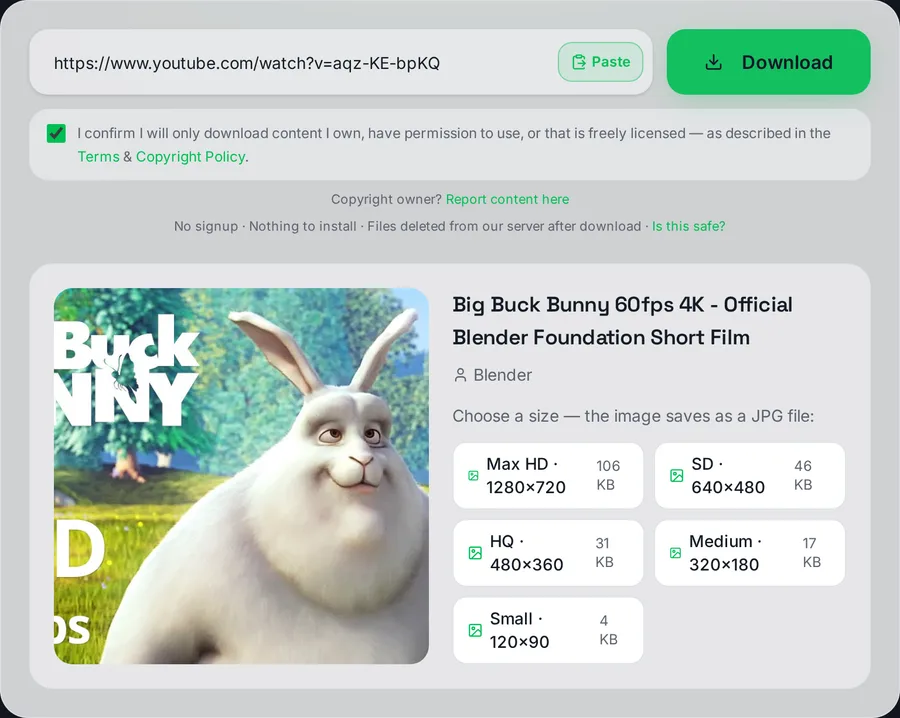
The thumbnail grabber showing five available image sizes from 1280x720 down to 120x90, each with its real file size in kilobytes.

Every thumbnail size YouTube holds for a video, with the real weight of each file.

Older or low-resolution uploads sometimes lack the max-res version, in that case the largest existing size is what YouTube has, and no tool can generate a bigger one.

All five sizes, the manual URL trick and reuse rules are covered in our guide: how to download YouTube thumbnails in full HD.

Who uses a thumbnail downloader

  • Creators, recover your own thumbnail when the original design file is lost, or audit how your art looks at each size.
  • Designers and editors, pull reference thumbnails for mockups, mood boards and competitive research.
  • Bloggers and educators, a video's official preview image for articles and slides (with credit to the creator).
  • Archivists, thumbnails disappear with deleted videos; the image is often part of the record.

Copyright note

Thumbnails are creative work owned by the video's creator, just like the video itself. Using someone's thumbnail in your own content, especially re-uploading it on your own videos, needs permission. Grabbing your own thumbnails or using others' for private reference is what this tool is for.

This educational tool is not affiliated with YouTube.

Frequently asked questions

What sizes can I download?

Every size YouTube stores for the video: Max HD 1280×720 (when available), SD 640×480, HQ 480×360, Medium 320×180 and Small 120×90. Pick any from the list.

Why is Max HD missing for some videos?

YouTube only creates the 1280×720 thumbnail when the uploader provided high-resolution artwork. Older or low-res uploads never got one. The largest existing size is shown instead.

What file format do I get?

JPG, exactly as YouTube stores it, with no re-compression and no watermark.

Does it work for TikTok or Instagram links?

This tool is YouTube-only. For other platforms, use their video downloaders. The video preview shown there is the platform's cover image.

Can I use someone else's thumbnail on my video?

Thumbnails are copyrighted creative work, just like the video. Downloading your own artwork or grabbing images for private reference is fine; reusing someone else's publicly needs their permission.

Need a video's cover?

Paste the link above and pick the size you want.

How was this tool?

5 / 5 · 1 rating

This tool is part of an independent, experimental and educational project. It is not affiliated with or endorsed by any video platform, and it is not intended to harm any company or violate any platform's policies. Please only download content you own, have permission to use, or that is public domain / Creative Commons licensed, and always respect the source platform's Terms of Service and copyright law.