
YouTube Video Downloader
Choose a resolution from 360p to 1080p and see the real file size before you download. H.264 MP4 that plays everywhere, with the audio merged in.
Copyright owner? Report content here
No signup · Nothing to install · Files deleted from our server after download · Is this safe?
How it works
Copy the link
Open the video you want and copy its URL from the address bar or the Share button.
Paste it above
Drop the link into the box and press Download. We analyse it in seconds.
Pick the quality
Choose a resolution from 144p up to 1080p Full HD.
Save the file
Watch the live progress bar. Your file downloads automatically when it's ready.
Pick a resolution and see what you actually get
This page is the resolution specialist. If you want the all-in-one box that handles video and audio side by side, that is the YouTube downloader. Come here when the question is which resolution you should pick and what the file will look like when it lands. Paste a link and you get the title, the duration and every resolution we can actually deliver, each with its real file size, before you commit to anything.
What 1080p, 720p and 480p really cost: measured, not estimated
We ran the same 10 minute 34 second video through this tool at every resolution it offers and recorded the delivered file. Source: the Blender Foundation's Big Buck Bunny, Creative Commons BY, in its 60fps upload.
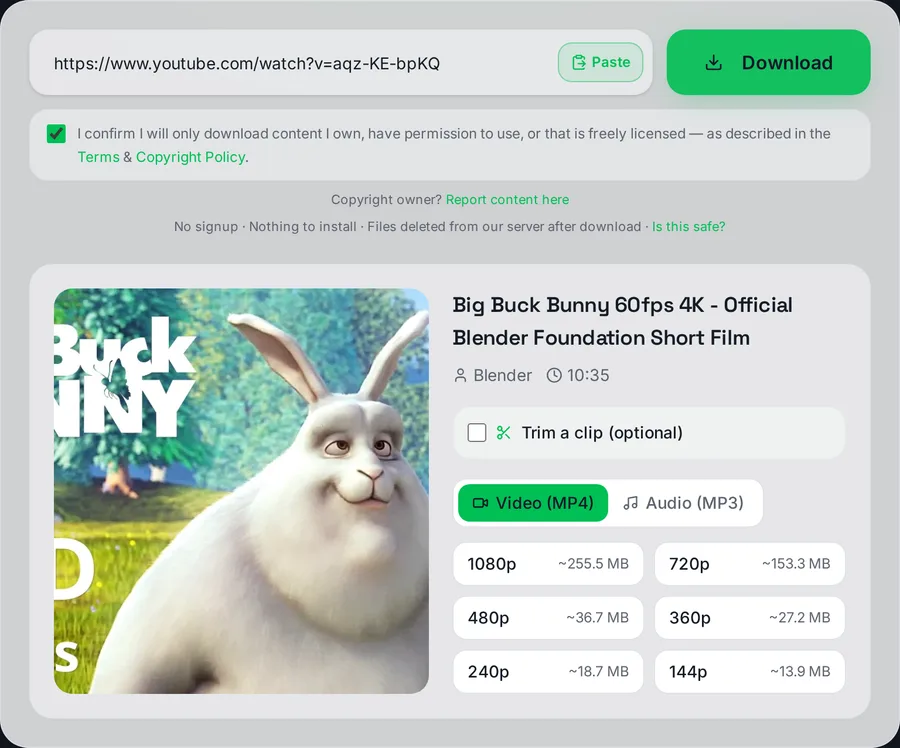
Every resolution the tool can deliver for this video, with the estimated size of each. These estimates are priced on the H.264 stream we actually download, so they match the delivered file.
| Resolution | Delivered | File size | Time to download |
|---|---|---|---|
| 1080p | 1920 x 1080, H.264 + AAC | 268,282,051 bytes (256 MB) | 25.4 s |
| 720p | 1280 x 720, H.264 + AAC | 161,192,857 bytes (154 MB) | 15.5 s |
| 480p | 854 x 480, H.264 + AAC | 38,777,162 bytes (37 MB) | 7.7 s |
| 360p | 640 x 360, H.264 + AAC | 28,865,104 bytes (28 MB) | 7.3 s |
The useful surprise is where the saving actually is. Going from 1080p to 720p cuts the file by about 40 percent. Going from 720p to 480p makes it four times smaller. If your goal is a small file for a phone or a slow connection, 480p is the setting that does the work, not 720p.
Those numbers are on the large side because that upload is a 60fps clip mastered from a 4K source, which is close to the worst case for file size. For comparison we ran a second upload of the same film, this one 24fps and 9 minutes 57 seconds long against the first one's 10 minutes 34. At the same 1280 x 720 resolution and the same codec it delivered 84,829,606 bytes against 161,192,857, a little over half the size, and only about six percent of that gap is the shorter running time. Further down the ladder the two uploads converge: 480p differed by 7 percent and 360p by 12 percent. At the high end, frame rate and how much motion is on screen move the file size more than the resolution label does.
Why the resolution you picked is sometimes not the one you get
This is the part most download sites leave you to guess at, so here is exactly what happens.
YouTube does not store one video per resolution. It stores several encodings of each resolution in different video codecs, and the codecs it offers are not the same at every resolution. We ask for H.264 (also written avc1) first, because H.264 is the format that plays on an iPhone, an older Android, a smart TV and inside Premiere, DaVinci Resolve or CapCut without converting anything first.
On that second upload we tested, this is what YouTube publishes:
| Resolution | Codecs YouTube offers | H.264 available |
|---|---|---|
| 1080p | AV1, VP9 | No |
| 720p | AV1, VP9, H.264 | Yes |
| 480p and below | AV1, VP9, H.264 | Yes |
Ask that upload for 1080p and you get a 1280 x 720 H.264 file, because 1080p simply does not exist in H.264 for it. We would rather hand you a 720p file that plays everywhere than a 1080p file that will not open on your phone. When a resolution is missing from the list, it is almost always this, and not a fault at your end.
1080p is the ceiling here, and that is a deliberate choice
We top out at 1080p Full HD. There is no 1440p and no 4K option, and it is worth being straight about why rather than quietly leaving them off the menu.
Above 1080p, YouTube publishes only VP9 and AV1. We confirmed this on the 4K upload we measured: at 2160p and 1440p the only codecs available were AV1 and VP9, with no H.264 at any of them. So a 4K download from YouTube is necessarily a VP9 or AV1 file. Those play fine in a modern desktop browser and badly or not at all elsewhere: iPhones will not play VP9 inside an MP4 container, something we hit directly with Instagram files and had to fix in our own downloader, and plenty of editing software will refuse the file or need a slow transcode first.
1080p is not an arbitrary cap. It is the highest resolution YouTube publishes in the codec that plays everywhere. If you specifically need 4K and you are happy handling VP9 or AV1 yourself, a desktop tool is the honest recommendation, and this is not it.
How to choose, in one line each
- 1080p. Keeping a master copy, editing, or playing on a TV. Expect a large file.
- 720p. The sensible default for watching on a laptop or tablet. Noticeably smaller than 1080p, still sharp.
- 480p. The real space saver. Best pick for phone storage or a metered connection.
- 360p and below. Only when the content is what matters and the picture does not, such as a talk or a lecture.
Audio is always merged in
Above 720p YouTube keeps the picture and the sound as two separate streams. Our server fetches both and merges them with FFmpeg before the file reaches you, so a high resolution download never arrives silent. That silent file problem is common enough on other sites that we wrote up what causes it and how to fix it.
Where people use this
- Offline viewing. Flights, commutes, and places where streaming is slow or metered.
- Backing up your own channel, keeping local masters of videos you created.
- Teaching and presentations, playing clips reliably without depending on venue Wi-Fi.
- Editing, where the H.264 MP4 output drops straight into Premiere, DaVinci or CapCut.
Works on phones, tablets and computers
The downloader runs entirely in the browser, with nothing to install. On iPhone use Safari and the file lands in the Files app; on Android it appears in Downloads and in your gallery. The device by device walkthrough is in our guide on how to download YouTube videos.
Related tools
Only need the soundtrack? The YouTube to MP3 converter makes a file a fraction of the size. Want the format conversion rather than the resolution question? See YouTube to MP4. Saving Shorts? The Shorts downloader keeps the vertical format clean. Several videos at once? Try the playlist downloader.
Please download only videos you own, have permission to use, or that are public domain or Creative Commons licensed. This educational tool is not affiliated with YouTube, see our legality guide.
Frequently asked questions
Can I download YouTube videos in 1080p?
Yes. 1080p Full HD is the highest resolution offered here, delivered as an H.264 MP4 with the audio already merged in. We measured a 10 minute 34 second video at 1080p: 268,282,051 bytes, ready in 25 seconds.
Why is there no 4K or 1440p option?
Above 1080p, YouTube publishes only VP9 and AV1, never H.264. Those files will not play on an iPhone and many editing apps reject them, so we stop at the highest resolution that plays everywhere rather than hand you a file you cannot open.
I chose 1080p but the file is 720p. Why?
That upload has no 1080p H.264 stream. YouTube offers different codecs at different resolutions, and when 1080p exists only as VP9 or AV1 we fall back to the highest H.264 resolution so the file actually plays. We verified this on a real upload where 1080p was AV1 and VP9 only.
Which resolution gives the smallest file?
The real saving is below 720p. In our measurements, going from 720p to 480p made the file about four times smaller, while going from 1080p to 720p only cut it by around 40 percent.
Do you keep a copy of my file?
No. Files are deleted from our server immediately after delivery. Nothing is stored or indexed.
How was this tool?
This tool is part of an independent, experimental and educational project. It is not affiliated with or endorsed by any video platform, and it is not intended to harm any company or violate any platform's policies. Please only download content you own, have permission to use, or that is public domain / Creative Commons licensed, and always respect the source platform's Terms of Service and copyright law.